

Sales & Purchases
The commercial edges of the operation. Quotations, sales orders, invoices, and customer receipts on one side; requisitions, RFQs, purchase orders, goods receipts, and supplier bills on the other.
Every workflow.
Connected.
The commercial edges of the operation. Quotations, sales orders, invoices, and customer receipts on one side; requisitions, RFQs, purchase orders, goods receipts, and supplier bills on the other.
Manage stock across warehouses, versioned BOMs, build orders, and project material requirements. Track commitments and cost layers, see what needs purchasing or building, and follow progress against the cost plan.
The financial record and what it says about the months ahead. A double-entry ledger with multi-currency and settlement. View your payable and receivable commitments that shape your cash position.
Quotation, order, allocation, dispatch, invoice, receipt. Every step keeps the agreement that created it, so the commercial promise and the money that settles it are never two separate stories.
Keep advances, credit notes, and payment revisions linked to the sale so your team can explain the outstanding balance.
Route requisitions through review and approval, request supplier quotations where needed, and carry approved requirements into purchase orders. Keep the request and the supplier commitment connected as the order is issued and revised.
Follow delivery schedules, goods receipts, service acceptance, and supplier bills against the order. Review matching differences and landed costs, with payment milestones showing when supplier payments are expected.
How purchasing, inventory and project costing work togetherDistinguish stock on hand, stock reserved for work, and stock still available at each location. Follow quantities and costs as materials move through the operation.
Manage transfers, issues, and dispatches with the document, lot, or serial information needed to trace each movement.
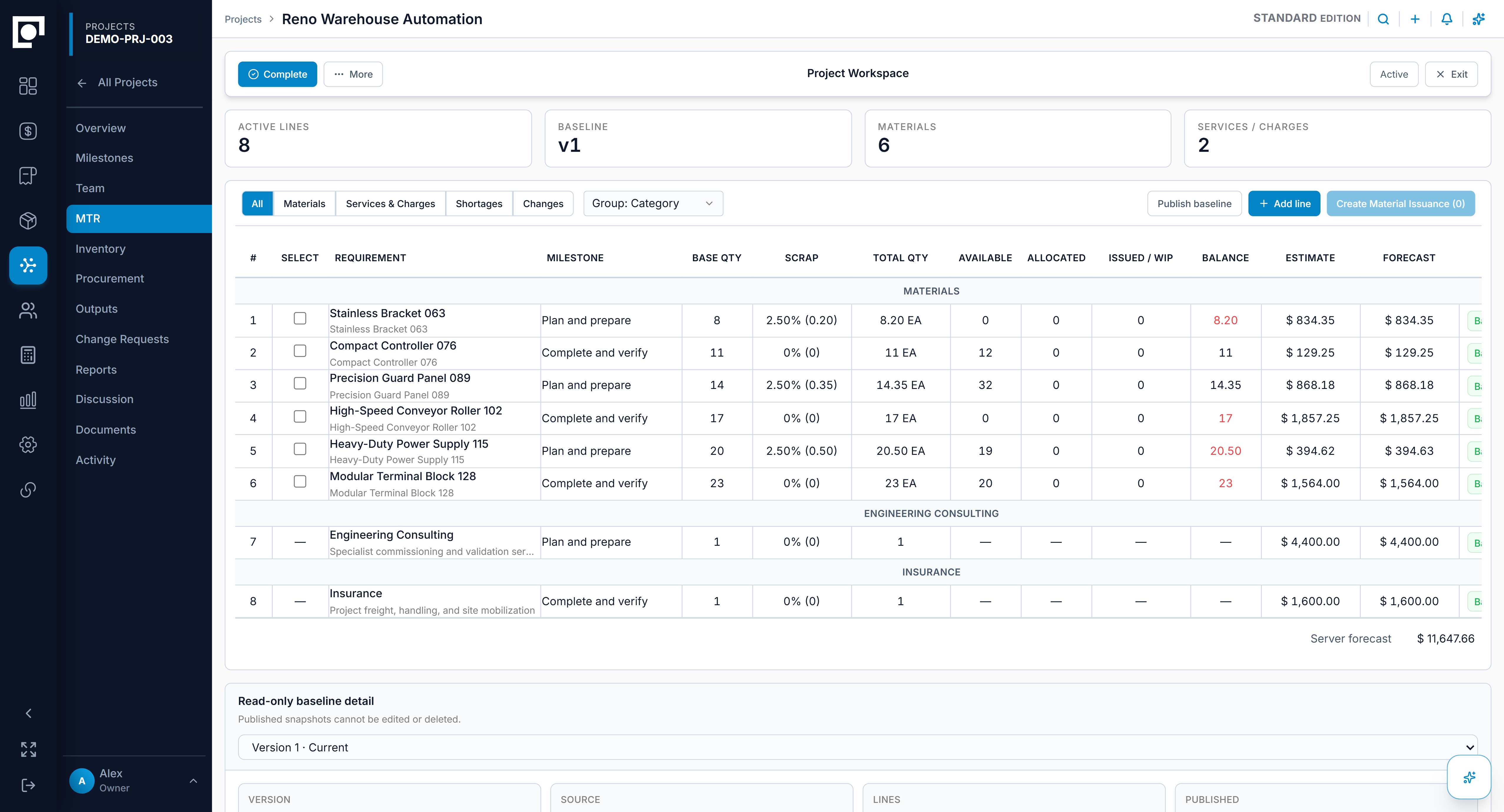
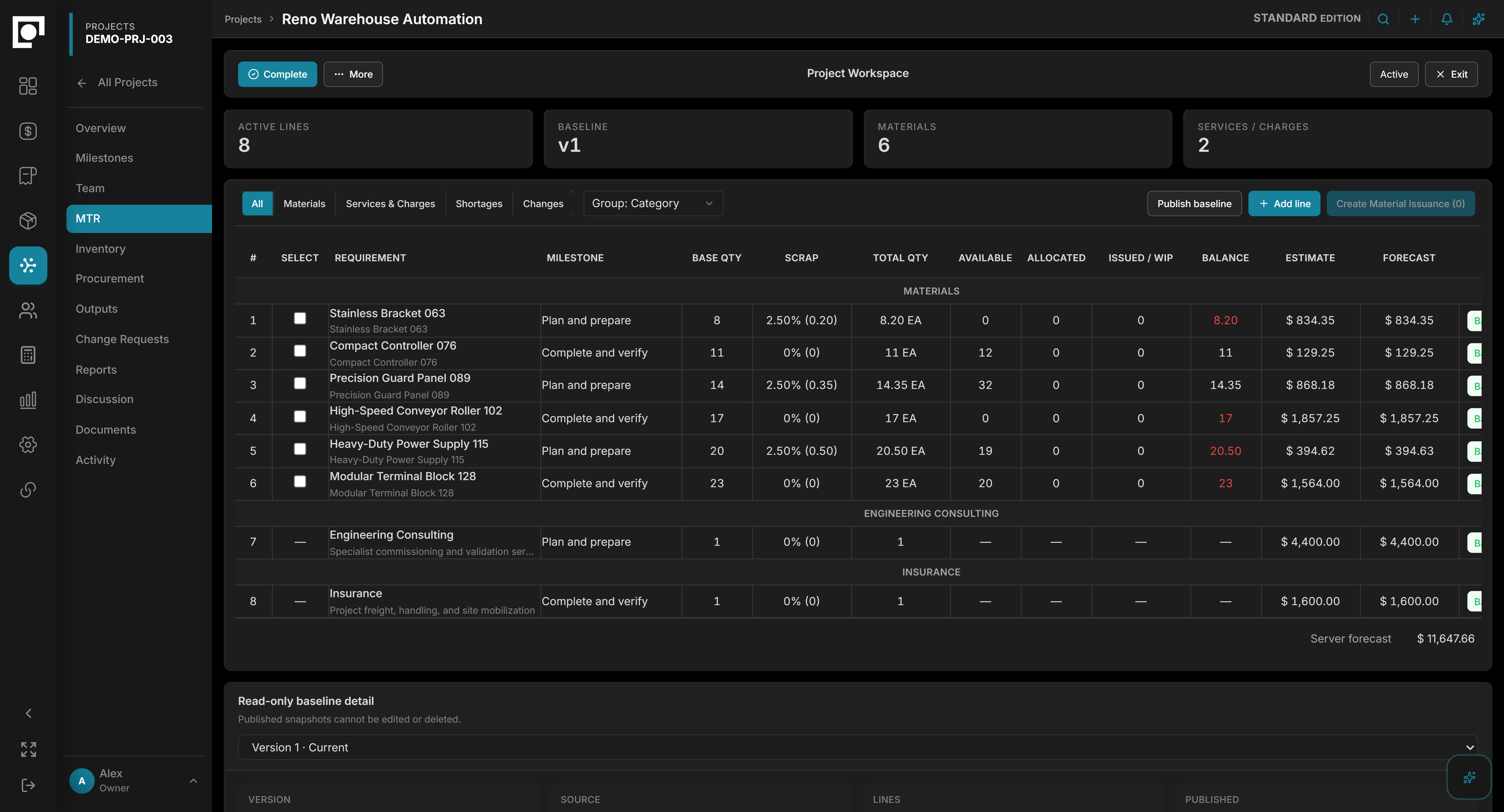
Plan what a job needs, check material availability, and turn requirements into purchasing and build orders. Keep an agreed baseline for materials, assemblies, services, and charges.
Track scope revisions and compare commitments, actual costs, and forecasts against that baseline to understand where the job is changing.
Datum Accounting brings journals, outstanding balances, banking, and multi-currency records into a controlled financial workflow. Review the entries and supporting activity behind a result.
For teams keeping QuickBooks Online or Xero, supported connections provide an alternative accounting path.
Explore Accounting →Cash commitments begin before an invoice or bill is raised. Datum forecasts from the underlying commitments—payment milestones agreed on a sales order and payable milestones on a purchase order—so the position ahead includes work that has been agreed but not yet billed.
See expected customer and supplier payments from agreed order milestones before invoicing.
Bring outstanding invoices and bills into view alongside future commitments.
Compare expected inflows and outflows to spot periods that may need attention.
Focus collection and payment planning on what is late and what falls due next.
Explore the daily experience your team uses across these modules, from finding a record to reviewing related work.
Use Dot to investigate a question across the records involved and prepare a response your team can review.
Most needs are met by your edition's modules and settings. Where they are not, we develop company-specific modules — and recurring patterns become new editions rather than one-off code.
Sales, purchasing, inventory, projects and manufacturing, accounting, and cash flow and reporting.
No. Every Datum edition includes its standard modules. You choose the edition, not a list of modules.
Yes. Purchasing covers the order, the receipt and the supplier invoice, and checks the three against each other before anything is paid.
Yes. A bill of materials sets out the plan; build orders and material issues record what was actually built and what it cost.