

Start with your question, the document or record in front of you, and the conversation so far.
The intelligence inside your operation.
Ask questions, investigate changes, and move work forward with an intelligence layer that understands your business context. Dot brings records, documents, analysis, and actions into the same conversation, helping your team turn information into the next step.
Start with a
real business question.
You do not need to know which module holds the answer. Start with the question, record, or document in front of you. Dot brings together the relevant information so you can understand what matters and decide what to do next.
- “Which shortages affect next week’s work?”
Identifies the missing materials, affected jobs, expected deliveries, and decisions needing attention.
- “Why did this project’s material cost rise?”
Separates changes in quantities, supplier prices, and project scope, with the records behind each change.
- “Compare these supplier quotations.”
Compares prices, delivery dates, and commercial terms, and highlights differences that affect the decision.
- “What makes up this account balance?”
Traces the balance to its entries and source documents, then investigates the items that need explanation.
- “Where do expected customer receipts leave us short against upcoming supplier payments?”
Compares expected receipts and supplier commitments to identify when a cash shortfall may need attention.
- “Prepare an RFQ for these materials.”
Prepares the request from the selected requirements and keeps it ready for review and the next purchasing step.
From your question.
To a clear next step.
Dot follows the work behind your request—bringing together relevant records, documents, and business context. Each step stays within Datum’s controls, from investigating the information and explaining a finding to preparing an action for review.
Establish the company context, permissions, and business rules that govern the request.
Use relevant records, documents, calculations, and workflow status to investigate the question.
Give a clear answer with the supporting records, so you can examine what led to it.
Prepare an action when needed, with review and approval before execution where required.
Document intelligence
Turn bills, purchase orders, delivery slips, and other operational documents into structured, reviewable data.
- Extract headers and line items
- Suggest source-document matches
- Prefill the correct workflow
Operational copilot
Ask questions across live company data and get answers grounded in the records behind them.
- Natural-language operational queries
- Source-linked evidence
- Draft documents and correspondence
Proactive agents
Continuously surface stock, spend, vendor, matching, and project risks before they become expensive surprises.
- Anomaly and risk detection
- Forecast and reorder recommendations
- Pending actions ready for review
Ask for the view you need.
Explore it on canvas.
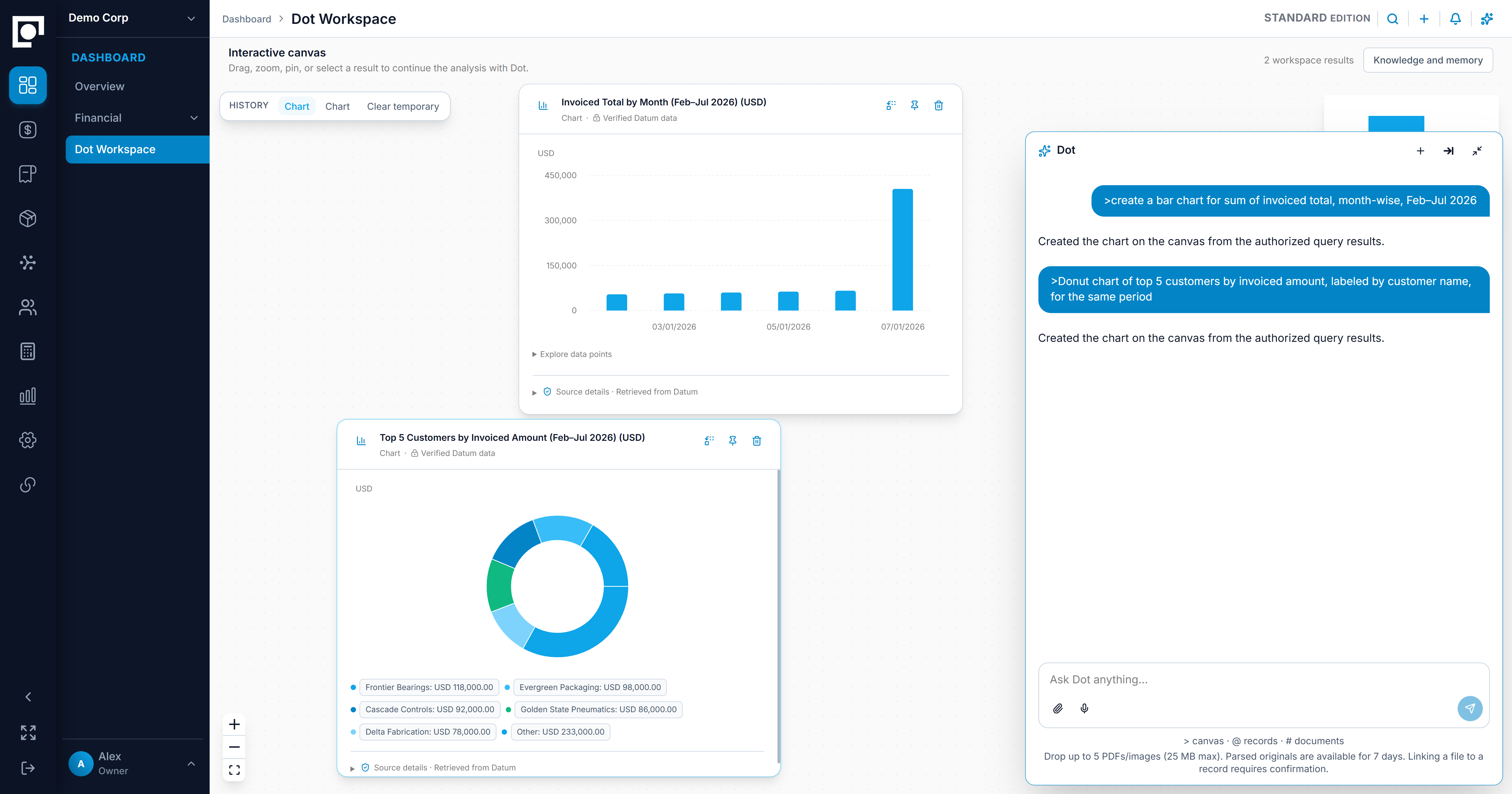
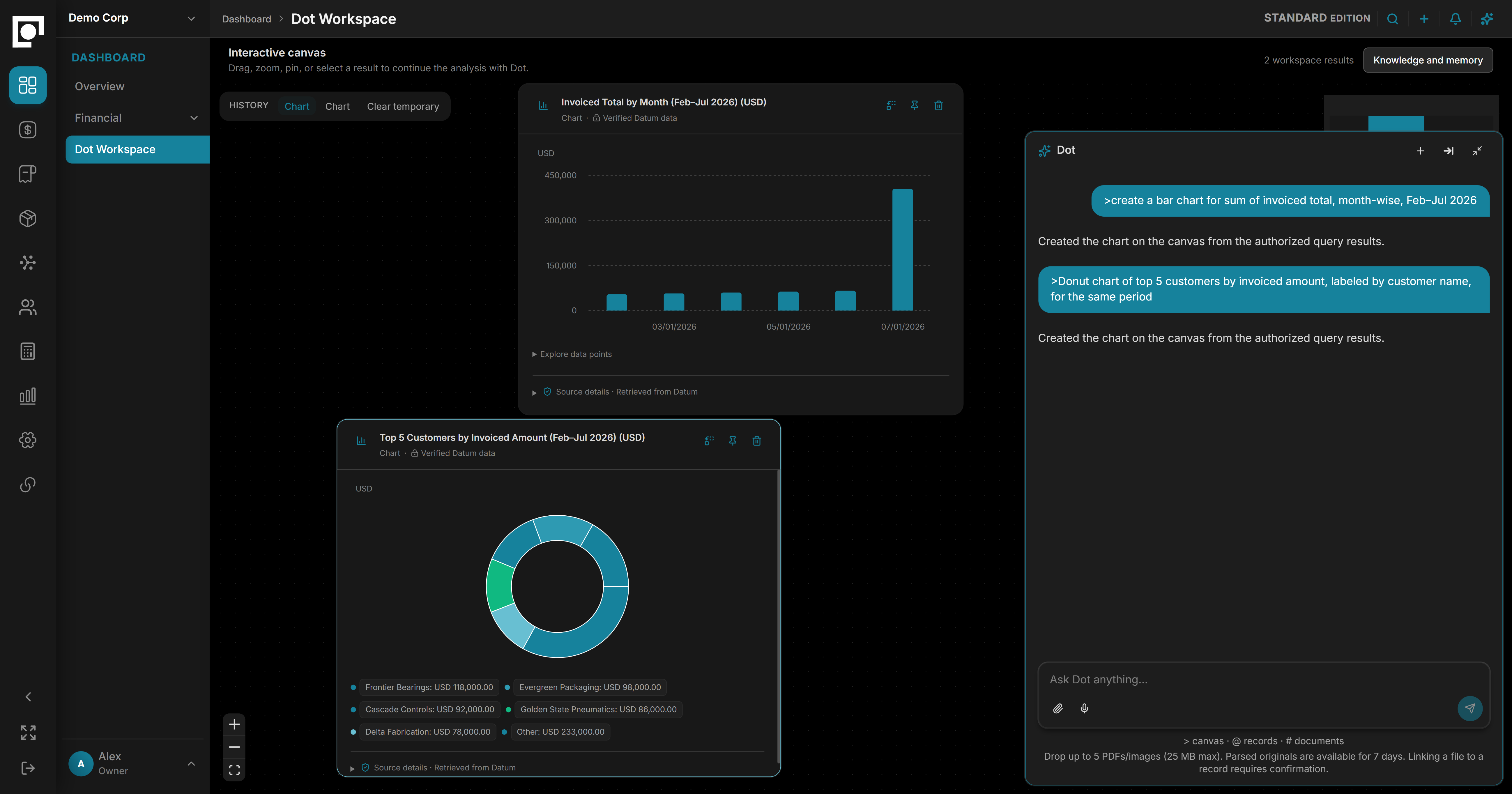
Dot Workspace brings the conversation and your analysis together. Request charts, tables, and comparisons, arrange them on the canvas, and keep exploring through follow-up questions. The business records behind the analysis stay within reach as you work.
Follow the next question
Ask for a breakdown, change the period, or explore a difference while keeping the original question in context.
Keep related views together
Arrange and pin charts, tables, and comparisons so you can examine different parts of the same business question.
Move from insight to the record
Open the supporting records to check a finding, review the work involved, or prepare the next action.
Learning and evolution
Intelligence that evolves.
On a foundation you can rely on.
Every company has its own terminology, priorities, and ways of working. Dot builds familiarity through context, preferences, and feedback, making assistance more relevant over time. Keep usage visible and benefit from evolving model capabilities while Datum’s records and business controls stay consistent.
Familiar with your business
Recognize the names, references, and terminology your team uses, with context specific to your company and its work.
Preferences and feedback
Build on preferred views, recurring questions, and corrections to make future assistance more useful while keeping current records authoritative.
Metered usage
See how much Dot your company uses through clear usage reporting, with included usage and limits agreed in your proposal.
Provider-independent
Benefit from advances in model capability while Datum retains your business context, permissions, calculations, and controlled workflows.
Useful enough to act.
Controlled enough to trust.
Dot works within the company, records, and permissions available to you. Datum applies the business rules, performs the calculations, and records the resulting actions, keeping assistance connected to the way your operation is managed.
Evidence you can follow
Answers and analyses link to the records behind the finding so your team can examine the basis for a decision.
Access that follows your role
Dot works within your authorized company context and access you have to records and actions.
Review before action
Proposed changes are presented for review and follow Datum's permissions and approval requirements before execution.
An attributable record
Actions remain connected to the user, company, and workflow involved so the result can be traced.
Common questions.
What can Dot do?
Dot answers questions from your own records, explains what changed, builds analyses you can work with, and prepares drafts. It also helps clean up and map data from CSVs, PDFs, and existing tools before it is imported into Datum.
Can Dot see data a user is not allowed to see?
No. Dot works inside the same permissions as the person asking. If you cannot open a record, Dot cannot read it either.
Does Dot act on its own?
No. Anything with consequences is prepared for you and waits for your approval.
Where do Dot's answers come from?
From your own records in Datum, not from the open web.
Is our data used to train AI models?
No. Datum does not use your records or conversations with Dot to train AI models. Dot may send the information needed for a request to an approved AI provider under governed data-use and retention controls. The conversation remains company data, while usage reporting records operational measures such as performance, failures, latency, and cost — not the business content of the request.